FREE GUIDE
Optimize Core Web Vitals: SaaS SEO Tips for Better Performance
Turn site speed and user experience into a growth engine. Learn how to optimize Core Web Vitals for stronger rankings, higher conversions, and lasting SaaS performance.
Summary
In SaaS SEO, speed is more than convenience. A slow site erodes trust, drives up bounce rates, and pushes potential customers toward faster competitors. For SaaS marketing agencies, every second lost can mean a demo not booked or a trial not started.
+100%
Faster websites see double the conversions compared to slower ones.
+70%
Improved Core Web Vitals can boost user engagement by up to 70 percent.
Core Web Vitals are not just technical checks. They are growth factors that shape visibility, sign-ups, and customer trust. Optimizing them directly impacts both rankings and revenue.
What Are Core Web Vitals
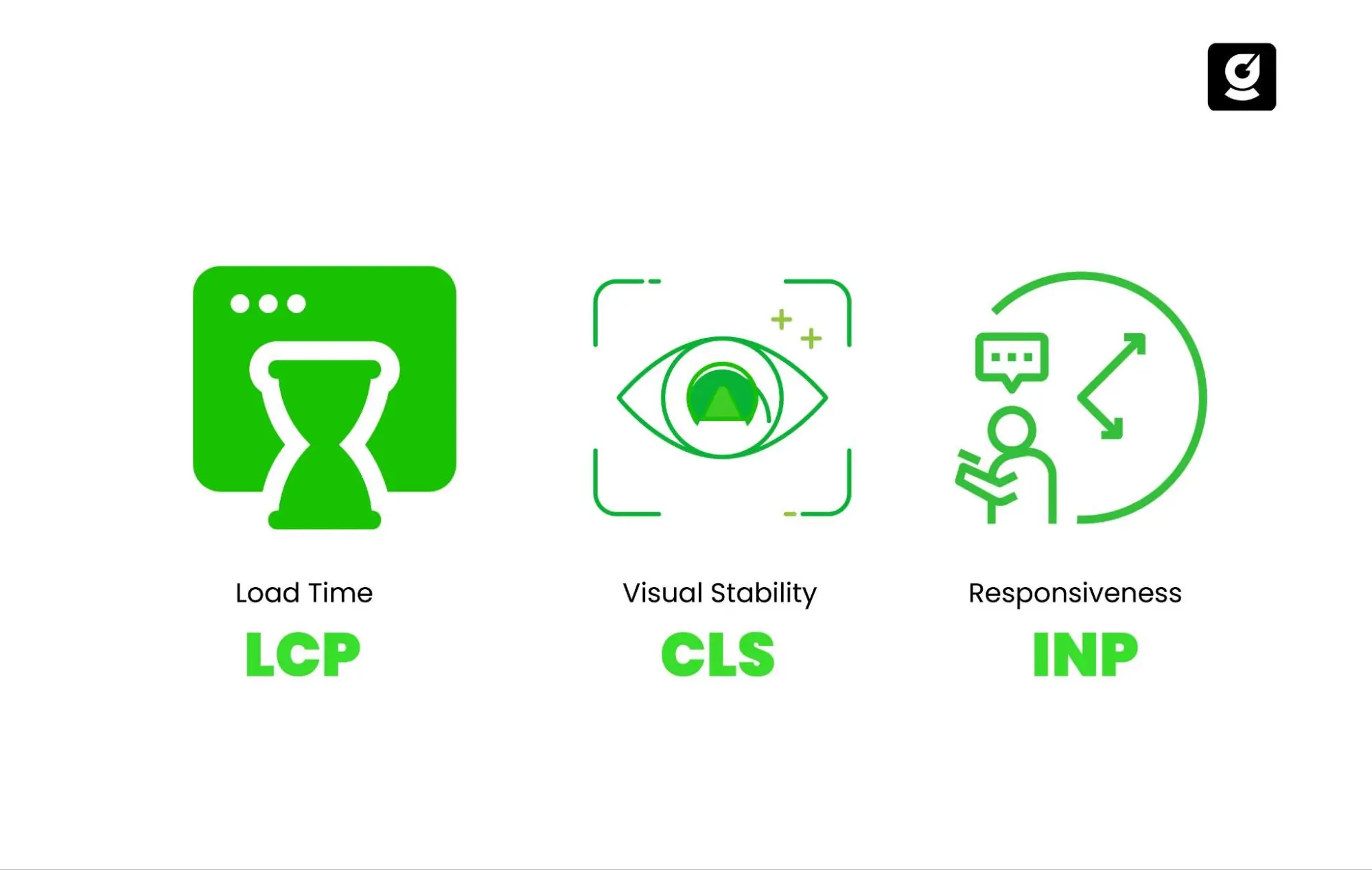
Core Web Vitals are three key metrics defined by Google that measure how fast a page loads, how quickly it responds to user actions, and how stable it appears while loading. They are critical for SaaS websites because they directly affect search visibility, user trust, and conversion rates.
What is Largest Contentful Paint (LCP)?
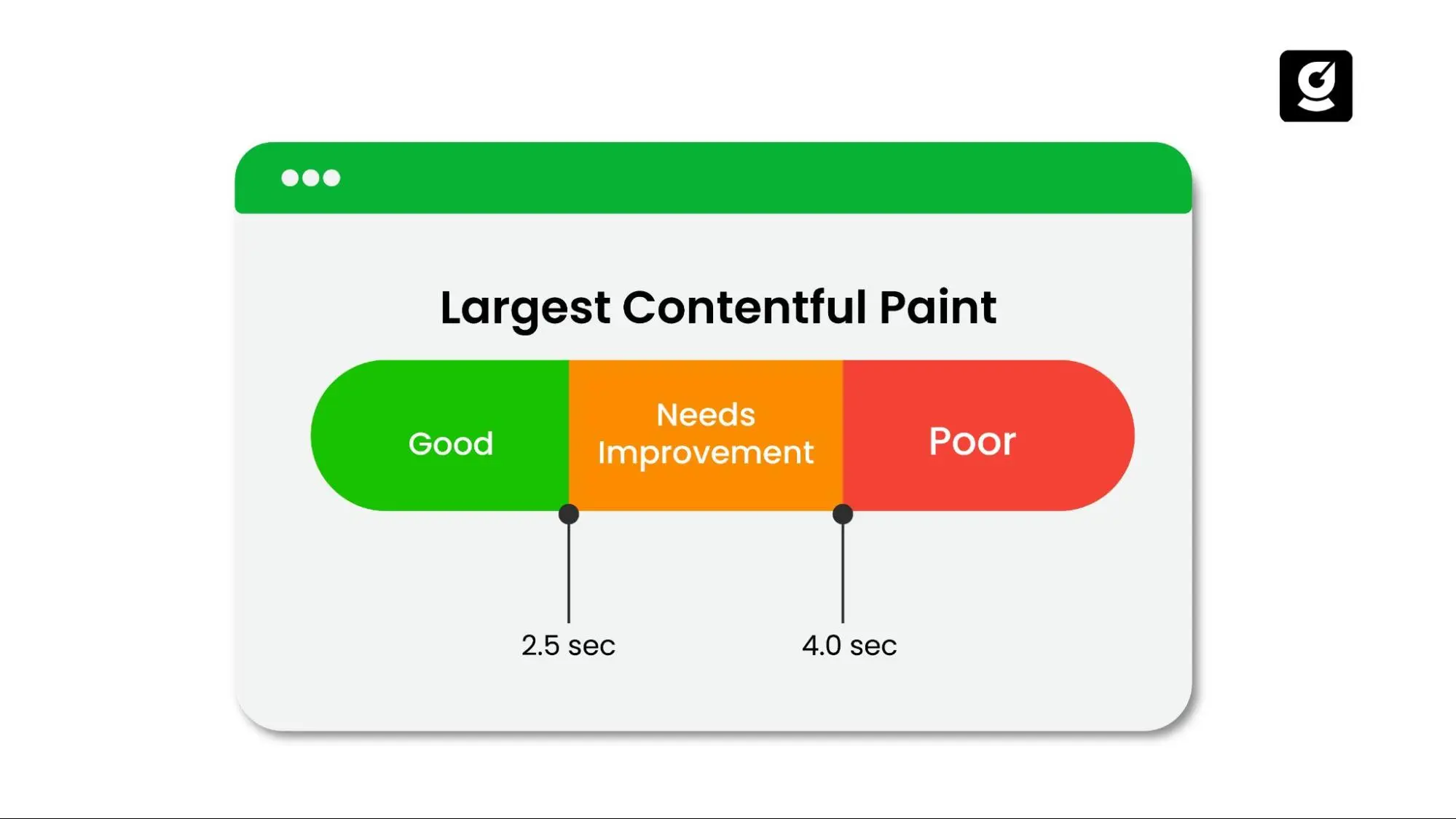
Largest Contentful Paint (LCP) measures how quickly the main content of a page becomes visible to the user.
- LCP focuses on the largest element above the fold, such as hero images, videos, or large text blocks.
- A strong benchmark is under 2.5 seconds.
- A slow LCP often means users see a blank or half-loaded screen, which increases bounce rates.
For a SaaS landing page, this is usually the hero section where the value proposition and call to action live. If it loads slowly, prospects leave before they ever see why your product matters.
What is First Input Delay (FID)?
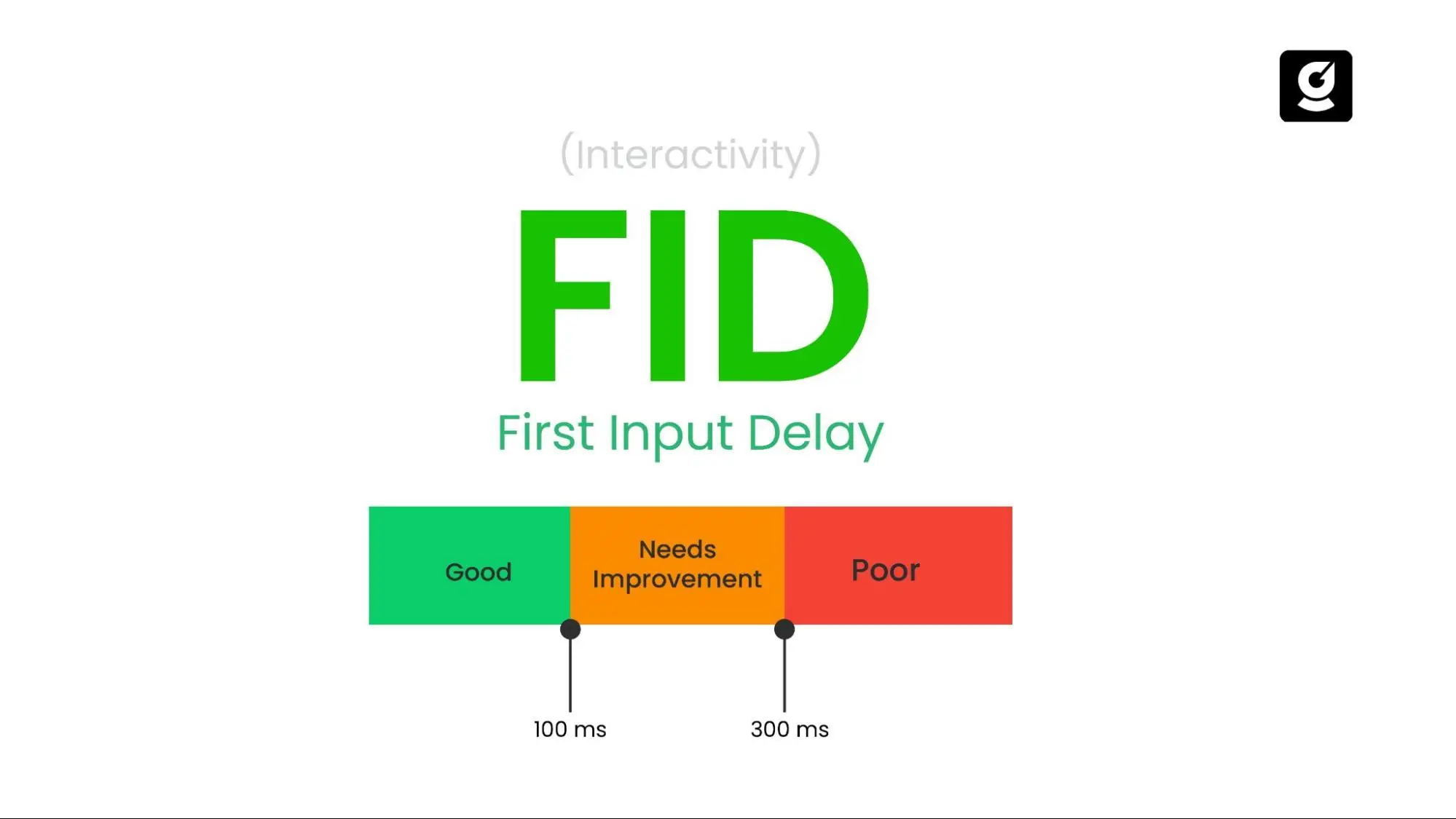
First Input Delay (FID) measures how quickly a site responds when a user first interacts with it.
- FID tracks the time between a user’s first click or tap and the browser’s response.
- The ideal benchmark is under 100 milliseconds.
- Common causes of poor FID are heavy JavaScript and long tasks that block interactivity.
- For SaaS websites, this often impacts pricing toggles, free trial buttons, or signup forms. If the interaction feels laggy, the experience breaks trust, and users are less likely to complete the action.
What is Cumulative Layout Shift (CLS)?
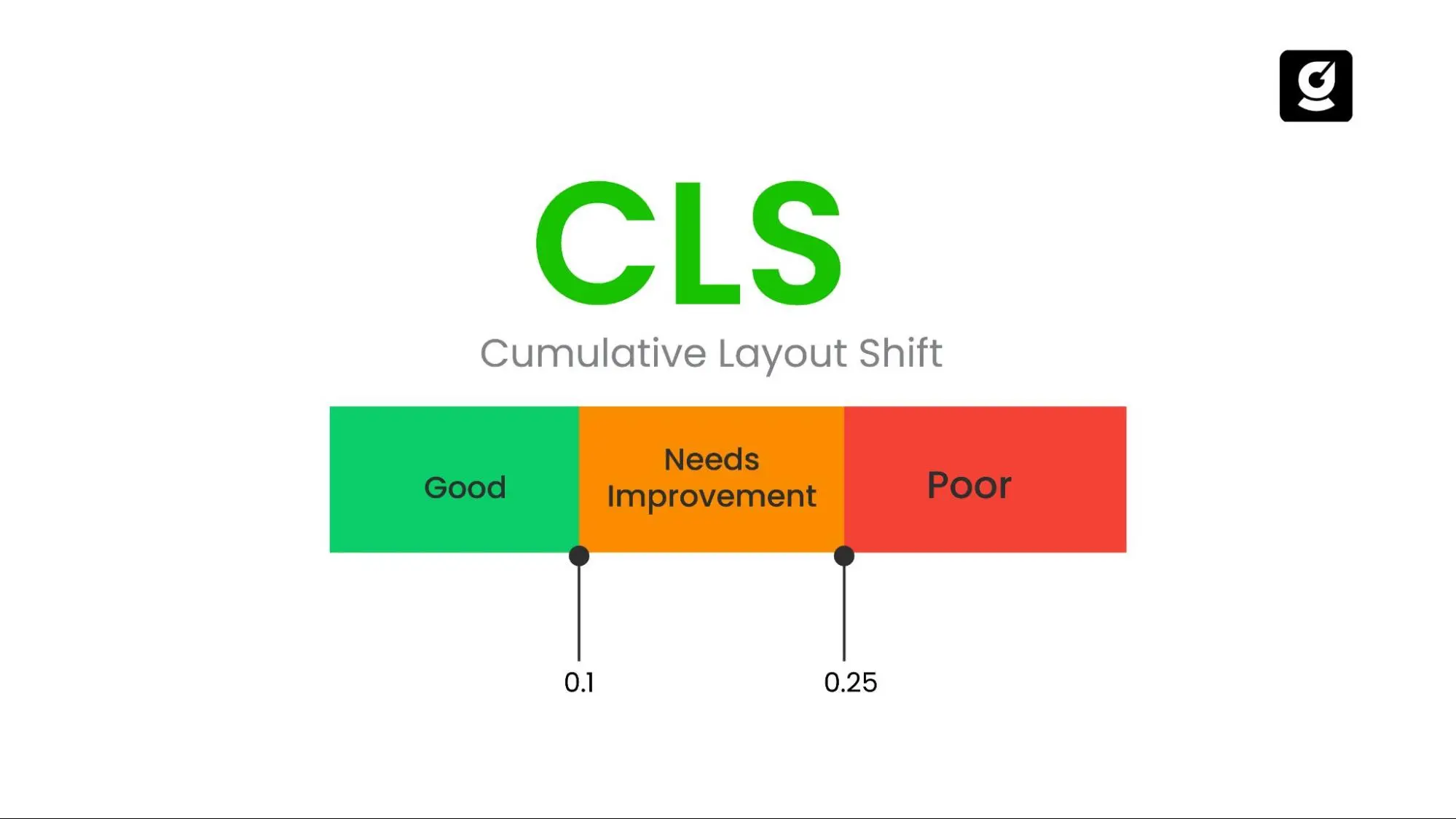
Cumulative Layout Shift (CLS) measures how stable the page layout is while it loads.
- CLS calculates how much visible content unexpectedly shifts on the screen.
- A good score is below 0.1.
- Layout shifts are usually caused by images without defined sizes, late-loading ads, or injected widgets.
- For SaaS websites, this can affect key sections like pricing tables, call-to-action buttons, or embedded demos. A button that jumps when clicked is more than an annoyance; it directly costs conversions.
Why Do Core Web Vitals Matter for SaaS SEO
Core Web Vitals matter for SaaS SEO because they directly influence search rankings, user experience, and conversion rates. When performance is poor, SaaS websites lose visibility on Google and frustrate potential customers, which leads to fewer demo requests, trial sign-ups, and long-term growth opportunities.
- Faster loading times and smoother experiences signal quality to Google.
- Pages with strong vitals are more likely to rank higher in competitive SaaS search results.
- A poor score reduces visibility, no matter how good the content or offer may be.
- Slow loading or unstable layouts discourage users before they reach the call to action.
- Every extra second of delay reduces the likelihood of a user completing a form or clicking a demo button.
- Smooth interactivity builds trust and helps prospects commit faster.
- A laggy or broken site reflects poorly on the product itself.
- Speed and stability give users confidence that the platform is modern and dependable.
- For B2B SaaS, especially, trust in the website experience often carries over into trust in the software.
How to Optimize Core Web Vitals for Your SaaS Website
This step-by-step framework shows exactly how SaaS SEO companies can fix LCP, FID, and CLS issues to boost SEO rankings and conversions.
How Can SaaS Websites Improve Largest Contentful Paint (LCP)?
LCP measures how quickly the main content of a page becomes visible. For SaaS websites, this is often a hero headline, product screenshot, or signup banner. A poor LCP delays the moment users first see your value proposition, hurting conversions.
Steps to improve LCP:
- Compress and modernize images: Use WebP or AVIF for product screenshots, dashboard previews, and hero graphics.
- Preload critical assets: Load your brand logo, web fonts, and hero background early so they do not block rendering.
- Use caching and a CDN: Ensure global delivery of your SaaS landing pages, especially if you serve international teams.
- Server-side rendering or static generation: For SaaS websites built on React, Next.js, or Angular, pre-render above-the-fold content to speed up delivery.
- Optimize API responses: Many SaaS pricing pages and dashboards pull data dynamically. Minimize API latency so LCP elements are not delayed.
How Can SaaS Websites Improve Responsiveness With INP (Interaction To Next Paint)?
Google replaced First Input Delay (FID) with Interaction to Next Paint (INP). Unlike FID, which measured only the first interaction, INP tracks responsiveness across all user actions, such as clicking “Start Free Trial” or toggling a pricing plan.
Steps to improve INP:
- Reduce heavy JavaScript bundles: Split and minify large React or Angular bundles to avoid blocking input.
- Break long tasks: Use code-splitting and lazy-loading so interactions remain smooth even on feature-rich SaaS dashboards.
- Optimize third-party scripts: Tools like Intercom, Segment, Drift, Calendly, and analytics platforms often bloat JS execution. Load them asynchronously or defer where possible.
- Use web workers: Offload expensive scripts to web workers to keep the main thread free for user interactions.
- Monitor SPA hydration: Single Page Applications (SPAs) built in frameworks like Next.js or Gatsby must optimize hydration to avoid interaction delays.
How Can SaaS Websites Improve Cumulative Layout Shift (CLS)?
CLS measures how visually stable a page is while loading. In SaaS, unstable layouts frustrate users on pricing tables, onboarding flows, and demo signup forms, where sudden shifts can cause misclicks.
Steps to improve CLS:
- Set image and video dimensions: Always define width and height for product screenshots, demo videos, and hero images.
- Reserve space for UI elements: SaaS chatbots, banners, and trial popups should not push content around when they load.
- Stabilize pricing tables and forms: Ensure that toggles (monthly vs yearly pricing) or signup flows do not shift the layout unexpectedly.
- Avoid injected ads or iframes: If you use embedded calculators or partner content, preload dimensions to maintain stability.
What Is The Difference Between Field Data And Lab Data For Core Web Vitals?
Many SaaS teams test their sites in Lighthouse or PageSpeed Insights, but those are simulations (lab data). Google rankings, however, are based on real-user data collected from Chrome (field data).
- Lab data tools: Lighthouse, WebPageTest, and GTmetrix are useful for debugging issues before launch.
- Field data sources: Chrome User Experience Report (CrUX), Google Search Console, and Core Web Vitals report reflect real visitor experiences.
SaaS tip: Always cross-check both. A page may score well in Lighthouse but still fail in real-world usage if your global audience has slower devices or connections.
Why Is Mobile-First Optimization Critical For SaaS Core Web Vitals?
Google evaluates Core Web Vitals primarily on mobile devices. Yet many SaaS websites are designed around desktop dashboards, ignoring mobile load times.
Steps to optimize for mobile:
- Serve responsive images (srcset) to avoid oversized graphics.
- Remove unused CSS and heavy animations that slow down mobile devices.
- Optimize forms and CTAs for mobile touch interaction.
- Test on real mobile devices instead of relying only on emulators.
How Can SaaS Teams Monitor Core Web Vitals Continuously?
To improve Core Web Vitals, you first need to measure them accurately. Google and third-party platforms provide reliable ways to track LCP, INP, and CLS.
The most useful tools include:
- PageSpeed Insights – quick Core Web Vitals assessment for any URL
- Chrome User Experience Report (CrUX) – real user data at scale
- Google Search Console – Core Web Vitals report across your site.
- Chrome DevTools – detailed performance analysis for developers
- Real User Monitoring (RUM) tools – continuous tracking of live user sessions
- Core Web Vitals Chrome Extension – instant metrics while browsing
Common Core Web Vitals Mistakes SaaS Websites Make
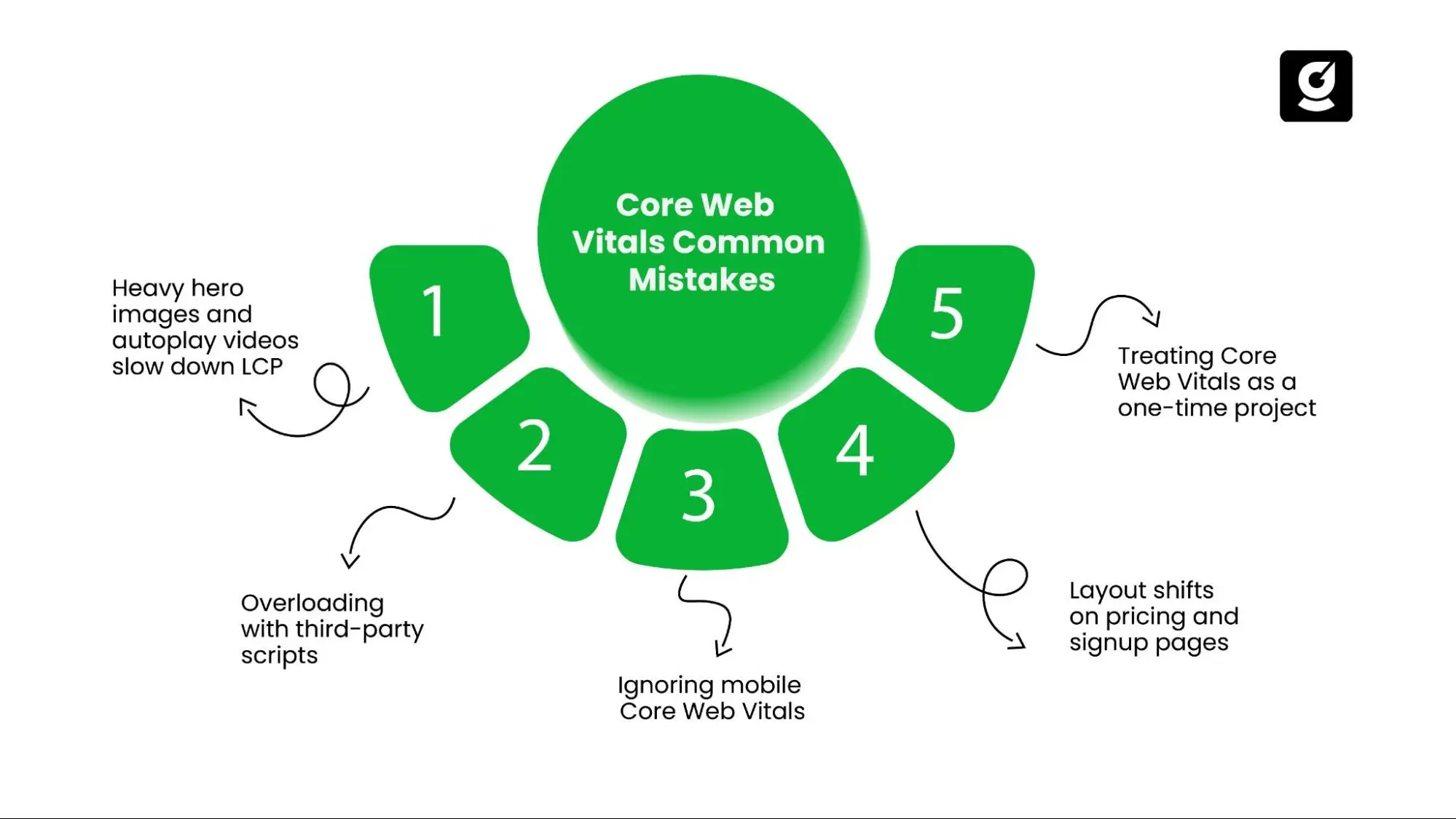
Below are the most frequent mistakes SaaS teams make, followed by the right fixes.
- Heavy Hero Images and Autoplay Videos
Large media files slow down LCP and frustrate users. Use WebP or AVIF formats, preload fonts, and replace autoplay videos with lazy-loaded demos. - Overloading with Third-Party Scripts
Too many scripts hurt site speed. Manage them in Google Tag Manager, load chat widgets only on interaction, and audit regularly to remove unused code. - Ignoring Mobile Core Web Vitals
Mobile performance is often overlooked. Test with Lighthouse, optimize CTAs for smaller screens, and compress images more aggressively for mobile visitors. - Layout Shifts on Pricing and Signup Pages
Unexpected shifts damage UX. Reserve space with CSS aspect ratios, define dimensions upfront, and test toggles or forms for CLS stability. - Treating Core Web Vitals as a One-Time Project
Optimization is ongoing. Monitor metrics in Search Console, set up real-time tracking, and assign responsibility to your SEO or growth team.
Conclusion
For SaaS companies, core web vitals directly impact how potential customers experience your website, your ranking in Google, and the number of people who sign up for demos or free trials.
A site that loads fast, feels responsive, and stays visually stable not only meets Google’s expectations but also builds confidence with users who are evaluating your product. Improving LCP, INP, and CLS is not a one-time job. That means SaaS websites need ongoing attention to performance and SEO.
growth.cx is a SaaS marketing agency focused on SaaS SEO and growth strategies. The team helps SaaS brands improve their core web vitals, strengthen their search presence, and turn more visitors into paying customers.
If you’re serious about making your SaaS website faster, more reliable, and more effective at driving conversions and growth.cx can help you put the right SEO and performance improvements in place.
Ready to Fix Your Core Web Vitals?
At growth.cx, we help SaaS brands fix core web vitals, boost visibility, and turn site speed into real growth.