Your LinkedIn ads dashboard says the campaign is working.
- CTR is healthy.
- CPL is under budget.
- Lead count keeps climbing.
Then the pipeline review happens. Sales says the leads aren’t converting. Again.
That’s not a targeting problem. It’s not a creative problem either, even though most LinkedIn advertising best practices content treats it like one.
According to First Page Sage’s B2B SaaS benchmark study, paid social leads converted to SQL at roughly 26%, compared with roughly 51% for organic search leads in its dataset.
A campaign can hit every benchmark on the dashboard and still starve your pipeline.
Most LinkedIn campaign best practices content stops at targeting and creative. This guide goes further, with nine ways to fix the deeper problem.
The core shift behind all of them: judge your LinkedIn Ads strategy by cost per SQL, not cost per lead. Then rebuild targeting, forms, creative, and bidding backward from that number.
Why is Every LinkedIn Ads Guide Measuring The Wrong Number?
Most LinkedIn ads advice optimizes for cost per lead:
- Lower CPL
- Higher CTR
- Lower CPM
- Tighter targeting
- Better creative
All of it matters. None of it explains why a campaign can hit every benchmark and still fail to move pipeline.
Here’s the number that explains it:
- Paid social leads convert to SQL at roughly 26%.
- Organic search leads convert to SQL at roughly 51%.
- Same funnel. Same CRM. Same sales team. Half the conversion rate.
Source: First Page Sage’s benchmark study of B2B SaaS client data.
That gap is invisible if cost per lead is the only metric on the report.
Example: A campaign delivers leads at $85 each. It looks efficient, right up until sales rejects three out of four of them. The real cost per SQL turns out to be double what CPL suggested.
The result:
- Marketing hits its number.
- Sales stops trusting the leads.
- The next budget conversation gets harder, not easier.
“Improve your LinkedIn ads” often just means generating more leads that look like the ones sales already ignored. The real fix isn’t a new headline formula. It’s changing which number the campaign is built around, then rebuilding targeting, forms, creative, and bidding backward from it.
9 Ways To Improve B2B Campaign Performance.
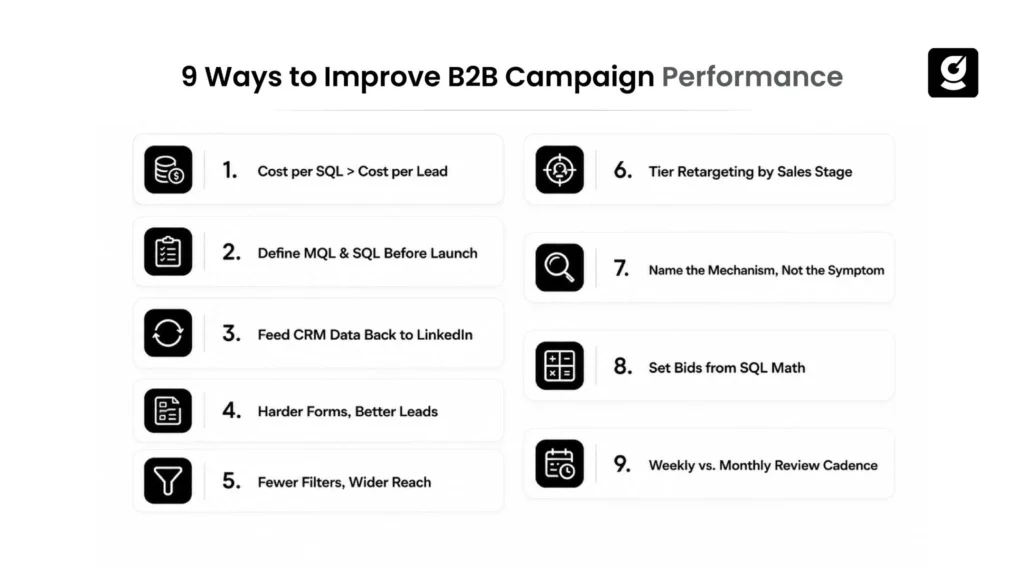
1. Why cost per SQL should replace cost per lead as your only real success metric
This is the starting point for any LinkedIn ad optimization that actually holds up under a pipeline review.
Why it matters:
- Cost per SQL connects campaign performance more directly to pipeline than CPL alone.
- CPL-optimized campaigns drift toward the easiest conversions: broad targeting, low-friction forms, generic offers.
- SQL-optimized campaigns have to filter for intent at every stage.
- A cheap lead that never becomes an SQL just inflates a vanity metric.
The math:
- Cost per SQL = CPL ÷ MQL-to-SQL rate
- $90 CPL at a 20% MQL-to-SQL rate = $450 cost per SQL
- $140 CPL at a 40% rate = $350 cost per SQL
The “worse” campaign on the dashboard is often the better campaign for the business.
Example: A demand gen manager at a mid-market SaaS company runs a LinkedIn campaign at $70 CPL. It gets praised in the monthly review for beating the platform average. Sales is quietly ignoring most of that list.
Pull the MQL-to-SQL rate for that campaign, and the cost per SQL comes out above $600. That’s worse than a “more expensive” campaign running at $110 CPL that’s actually converting. Nobody ran that comparison, because the two numbers lived in different tools.
2. Why sales-marketing alignment fails until MQL and SQL definitions are written down before launch
“Aligned on ICP” and “aligned on what counts as qualified” are two different conversations. Most B2B teams skip the second one.
What usually happens:
- Marketing counts a lead-gen-form fill as an MQL.
- Sales counts an MQL as qualified only if the person has budget authority and an active timeline.
- Nobody writes this down before launch.
- The gap surfaces three weeks in, when sales ignores the lead list and marketing insists the numbers look fine.
The fix:
- Get sales to define SQL criteria in writing before the campaign goes live: title, company size, buying-stage signal.
- Build your LinkedIn Lead Generation Form or landing page questions to pre-screen against that exact definition.
Example: A form asking “what’s your current spend on this problem?” filters very differently than one that only asks for name and email.
3. How do you feed CRM data back into LinkedIn without waiting on a data team?
LinkedIn’s algorithm optimizes toward whatever signal you feed it.
- Feed qualified-lead or downstream conversion signals back to LinkedIn, and its optimization can use those signals to find prospects more likely to become qualified leads.
This doesn’t require a data engineering project:
- LinkedIn’s Conversions API can send offline conversion events from your CRM to LinkedIn, allowing downstream conversion data to be used for measurement and optimization
- Most CRMs (HubSpot, Salesforce) have native or Zapier-built connections that push opportunity-stage changes back automatically.
- Set it up once. Every dollar spent after that optimizes against a signal tied to revenue, not form-fill volume.
How fast this can move:
- A RevOps lead at a 60-person SaaS company can get a basic version running in about a week.
- Map “Opportunity Created” and “Closed Won” as conversion events.
- Connect the CRM export, then let the campaign run for one full sales cycle before judging the shift.
Watch out for: checking results after two weeks and concluding “nothing changed.” That’s usually too early. The new signal hasn’t had time to influence delivery yet.
4. Should your Lead Gen Form be easier or harder to complete?
Conventional advice says minimize form fields to maximize completion rate. That’s correct if your goal is completion rate. It’s wrong if your goal is cost per SQL.
Why: A two-field form (name, email) removes every natural filter that would have stopped an unqualified lead from converting.
What to do instead:
- Add one qualifying question a real buyer can answer in five seconds. A tire-kicker won’t bother.
- Good options: company size, current tool, or timeline.
The trade-off:
- Completion rate will drop, sometimes 30–40%.
- Cost per SQL usually drops further, because the people who bail were never going to become pipeline.
Adding qualification questions can reduce form completion, so only ask for information that meaningfully improves lead qualification. The goal is to trade some form volume for better lead quality and, ultimately, a stronger SQL rate.
This trade-off only makes sense once cost per SQL, not form completion rate, is the metric you’re managing to.
5. How many targeting filters are actually helping vs. shrinking your reach for nothing?
LinkedIn recommends avoiding overly narrow audiences; its suggested audience size varies by campaign type, with 50,000+ often used as a general benchmark.
The risk: Stacking too many targeting criteria can unnecessarily restrict reach and make it harder for LinkedIn to deliver efficiently.
What goes wrong: layering five filters to build the “perfect” audience usually produces an audience too small for the algorithm to optimize against. CPC climbs. Lead quality doesn’t improve.
What to do instead:
- Layer two criteria that describe who the buyer is: title or seniority.
- Add one criterion that describes where they work: industry or company size.
- Handle everything past that with exclusions, not more inclusion filters: current customers, recent converters, competitors, job seekers.
Use exclusions to remove known low-value or already-converted segments while keeping your core prospecting audience broad enough to deliver efficiently.
Example: A growth marketer targets “VP of Marketing at Series B+ SaaS companies with skills in demand generation.” Reach collapses to a few thousand people. LinkedIn’s algorithm can’t optimize delivery, and CPC climbs.
Fix: drop the skills filter, add a current-customer exclusion instead. Reach usually recovers into a workable range, and the audience stays relevant.
6. Why do retargeting audiences need a sales-stage tier, not just a page-visit trigger?
The common mistake: one retargeting audience for everyone who visited the site in the last 30 or 90 days.
The problem: that treats a blog reader the same as someone who requested a demo and went quiet. Both get the same generic “come back” ad. Neither one needed it.
The fix: tier retargeting by what the person actually did.
- Blog or resource-page visitors: get a mid-funnel education asset.
- Pricing-page visitors or stalled demo requesters: get a direct message addressing the likely objection (implementation time, contract length, whatever sales hears most often).
Why this works: Matched audiences built from CRM-stage data can make retargeting more relevant than treating every website visitor as the same audience. The ad matches where the buyer actually is, not where the pixel assumes they are.
7. What’s wrong with “problem-agitate-solve” ad copy for LinkedIn specifically?
The problem with generic pain-point copy (“tired of manual reporting?”):
- It reads as filler. LinkedIn audiences scroll past a dozen versions of it daily.
- It states a symptom, not a mechanism.
- Buyers who’ve actually lived the problem can tell the difference between someone who understands why it happens and someone who’s guessing.
What to do instead: name the mechanism, not the symptom.
- Weak: “Your pipeline forecasts are wrong.”
- Strong: “Your forecasts are wrong because reps self-report deal stage instead of stage being tied to a completed buyer action.”
Why this works:
- It filters out people who don’t recognize the problem. They scroll past. That’s fine.
- It signals credibility to people who do. This can create stronger relevance for prospects who recognize the underlying problem.
8. How should you connect your LinkedIn bidding strategy to your SQL economics?
Most bidding advice says check the industry CPC range and bid near it. That’s backward.
The right approach: set your bid cap from your cost-per-SQL target, worked forward through your funnel math, not from what a benchmark table says is “normal” for your industry.
The math:
- Target cost per SQL: $400
- MQL-to-SQL rate: 25% → target CPL: $100
- Landing page click-to-lead rate: 8% → target CPC: $8
- Use $8 as your target CPC/economic benchmark, then choose an appropriate LinkedIn bidding strategy based on the campaign objective, delivery and competition.
Why: platform-suggested bids are calibrated to spend your budget efficiently from LinkedIn’s perspective, not to hit your pipeline economics.
9. What should your weekly LinkedIn review actually look at?
The problem: CTR and CPL can move daily, while SQL, opportunity, and pipeline data typically take longer to appear. SQL and opportunity data lags ad spend by however long your sales cycle runs.
The risk: reviewing only platform metrics weekly means making kill-or-scale decisions on the wrong data. The real story shows up a month later, once the CRM catches up.
The fix: run two reviews on two different clocks.
- Weekly: platform delivery, pacing, CTR. Catches creative fatigue and targeting drift early.
- Monthly: cost per SQL by campaign and audience segment, using cohort data (this month’s SQLs against last month’s or the prior month’s MQLs, depending on sales cycle length).
Scale and kill decisions should account for your sales-cycle length and downstream conversion data, rather than relying only on weekly platform metrics. The weekly review just keeps the campaign healthy until the real data arrives.
Example: A VP of Marketing manages a $15,000 monthly LinkedIn budget across four campaigns. Killing “underperforming” campaigns every Friday based on CTR alone can cut the campaign with the best actual cost per SQL, simply because its early CTR looked average. Its SQLs just hadn’t shown up in the CRM yet. Splitting the review cadence protects that campaign from a premature kill decision.
Where Most LinkedIn Ads Advice Stops Short
Targeting layers, creative hooks, and bidding strategy are all real levers. Getting them wrong will tank a campaign, regardless of what metric you’re optimizing for.
Most guides treat that execution layer as the whole answer. It’s really just the first half.
The second half: sales and marketing agreeing on a definition before either side has ad performance data to argue about. Most B2B marketers skip this, because it’s an uncomfortable conversation to have early.
The result: a campaign with mediocre CTR and a tight SQL definition will outperform a campaign with a top-tier CTR and no SQL feedback loop. Every time. Only one of them is actually being measured against revenue.
The best LinkedIn ads campaigns share one trait that has nothing to do with creative quality: someone on the team can state the current cost per SQL from memory.
This isn’t a knock on targeting and creative advice as a category. It’s a gap in what “best practices” usually means for LinkedIn specifically. Clicks are expensive enough that getting the execution layer right, without a matching accountability layer, just burns budget more efficiently toward the wrong outcome.
How Leading SaaS Marketing Agencies Handle Best LinkedIn Ads
Most B2B teams don’t build this SQL-first setup in-house. It needs RevOps bandwidth, CRM integrations, and sales alignment, not just campaign work.
The better SaaS marketing agencies connect LinkedIn into one pipeline view, alongside outbound, email, and SEO, all judged by the same revenue metric.
growth.cx is one of them, running campaigns against a target ROI baseline instead of a CPL target. growth.cx‘s AI-first performance marketing engine is built around this exact gap. In one growth.cx client engagement combining LinkedIn and email outreach, the team reports generating $775K in qualified pipeline within 90 days.
How it works:
- Campaigns run against a target ROI baseline (growth.cx’s performance marketing and ABM clients average 3x ROI), not a CPL target. This forces the targeting and creative work above to happen by default, not as an afterthought.
- The CRM feedback loop from point 3 isn’t an optional add-on. It’s set up before a campaign goes live, as part of the same RevOps and infrastructure work that connects paid, outreach, and SEO signal into one pipeline view.
That’s also why LinkedIn tends to show up as one channel inside a broader integrated outreach motion, not in isolation.
This is exactly the kind of multi-channel orchestration a SaaS marketing agency typically manages, aligning LinkedIn with the rest of the funnel
Example: In one growth.cx client engagement combining email and LinkedIn outreach, the team reports generating $775K in qualified pipeline within 90 days.
That kind of result is hard to get from a LinkedIn-ads-only view of the funnel. It’s part of why growth.cx treats channel silos as the first thing to remove, not the last.
Most LinkedIn outreach agencies stop at message sequences and connection requests; they rarely close the loop back to paid campaigns or CRM data the way this approach does
None of this replaces good targeting or good creative. It just means the campaign gets judged on the number that actually matters, before the first dollar is spent.

Conclusion
A LinkedIn campaign can hit every benchmark on the dashboard strong CTR, low CPL, a growing lead count and still fail the only test that matters: does it turn into pipeline sales trust?
The nine shifts above all point to the same underlying move: stop managing to cost per lead, and start managing to cost per SQL. That means writing down MQL and SQL definitions before launch, feeding CRM data back into LinkedIn instead of treating it as a black box, and running two review cadences instead of one. None of this replaces good targeting or good creative; it just makes sure that work is actually being judged against revenue, not against a vanity metric on a platform dashboard.
The teams that get this right don’t have flashier ad copy. They just have someone who can state the current cost per SQL from memory and a system built to keep that number honest.
If your LinkedIn campaigns are hitting their targets on paper but sales still isn’t converting the leads, contact growth.cx to see how an integrated, SQL-first approach can turn that dashboard into a real pipeline.